How it works
A short check-in on a gentle rhythm. One clear next step.
Three people answer a short check-in by private link. New starters get theirs by email, and a line manager or buddy without a work inbox will soon be able to get theirs by WhatsApp.
- Getting started
Add your new starters
One at a time, or upload a spreadsheet saved as a CSV file from your HR system (pasting a list works too). No integration to set up.
Too busy to add new starters yourself? Invite a people administrator to do it for you. They add and update new starters only, and see no answers.
The first check-in goes out two days after the start date, then weekly for the first month, then every two weeks until six months.
Front line and shift roles are asked more often in their first three months, and the questions change as the person settles. Time away for leave or illness pauses the check-ins and is never counted against anyone.
Who answers, and when
Three people answer. Each sees something the others cannot.
The new starter
A private link by email, to a work address. About a minute. No app to install, no password.
Gets a short check-in of about a minute on a gentle rhythm, asking how their start actually feels: how welcome, how clear, how connected, how the work is going. Every check-in also lets them ask for a word with their line manager, or a private word with someone senior who is not their line manager.
The buddy
A private link by email, and soon by WhatsApp without a work inbox. Under a minute. No login.
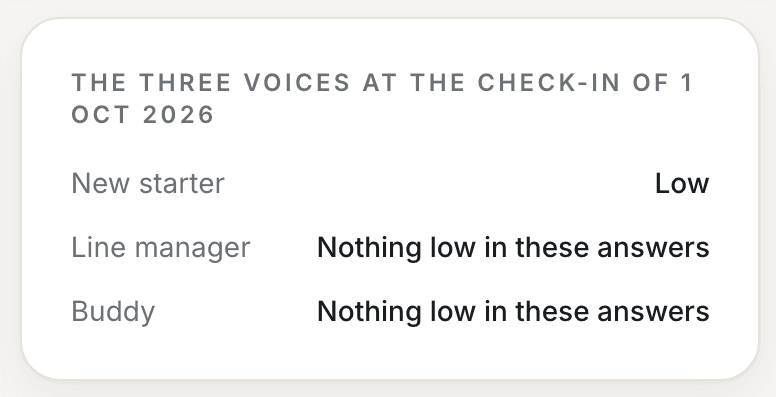
Answers a few short questions on how the person seems socially: included, settled, part of the team. The buddy's read often sees what a line manager cannot, and it is one of the three that build the picture.
The line manager
Gets a private link at each check-in, by email, and soon by WhatsApp if there is no work inbox, and gives a quick read on how settled the new starter seems, in under a minute and with no login. Then, on the Accolgo platform, they sign in to see their new starters, with anyone who needs them at the top of their team list. Clicking on a person shows the colour, a plain-English next step and suggested opening lines, and any note the new starter wrote to them. One tick marks a conversation done. A short weekly summary email tells them how many need attention.
Your team
Plovercombe Group. New starters marked as needing attention are listed first.
Sofia Ramos
Sales Executive · started 14 Sep 2026
Tom Hargreaves
Warehouse Operative · started 14 Sep 2026
Nia Davies
Care Assistant · started 21 Sep 2026
Grace Bennett
Retail Assistant · started 11 Oct 2026
Daniel Okoro
Commis Chef · started 21 Sep 2026
Check-ins go out by email by default. A line manager or buddy who does not have a work inbox will soon be able to get theirs by WhatsApp instead, chosen per person.
Built for every kind of role, not just office jobs
Head office staff, a construction crew and a retail team do not leave their jobs at the same rate. When you add a new starter, you can say which of three kinds of role they are in.
Professional and office
Professional services, tech, corporate roles. The lowest turnover of the three.
Operational
Construction, healthcare, the public sector. Turnover sits between the other two.
Front line and shift
Hospitality, retail, warehousing. The highest turnover of the three, so check-ins come more often at the start.
Why it matters: front line and shift starters get a check-in every four days for about their first three months, so a change shows up sooner where turnover is highest. The kind of role also decides who comes first in a line manager’s list when several people need the same attention, and keeps the suggested opening lines suited to the work.
Already partway through their first six months?
You can still add them. Say someone started two months ago: add them with their real start date and Accolgo works out where they are.
- They get a short welcome email explaining that they are joining partway through and what is done with their answers. Their first check-in opens with a plain explanation of what Accolgo is.
- Their check-ins pick up from where they are, not from the beginning. Their first one arrives within a day or two.
- It still ends six months from their start date. Someone added two months in gets about four months of check-ins. Anyone already past six months cannot be added.
- Their line manager, and their buddy if they have one, answer at that same first check-in, so the line manager has a read straight away.
Why it still works: a start can still go wrong in month three or four, and those months are still covered. The line manager gets a read now, rather than finding out when the notice arrives.
What the line manager gets
Not a dashboard of numbers. A prompt, and the words to open with.
Example nudge
It is worth making a little time for Sofia this week. Her recent check-ins suggest she is finding it harder to settle than she was. A warm, no-agenda chat now tends to pay off well before it becomes anything bigger.
You could open with
“I wanted to check in properly. How are things feeling for you at the moment?”
A trust-based system
Nobody reads individual answers from new starters, line managers and buddies, and that includes the head of people and everyone in HR. Accolgo's software turns them into a colour, the reasons behind it and a suggested next step for the line manager. The answers are encrypted at rest by our database provider. A note is different. If a starter writes a note to their line manager, the manager reads it. If the starter's next check-in is still not settling, the head of people sees the note too, with what the manager did. A note that raises a safety concern also goes to HR when Accolgo picks it up, or to HR alone if it is about the manager.
What the Head of People sees
Every new starter in one view. Step in only where it matters.
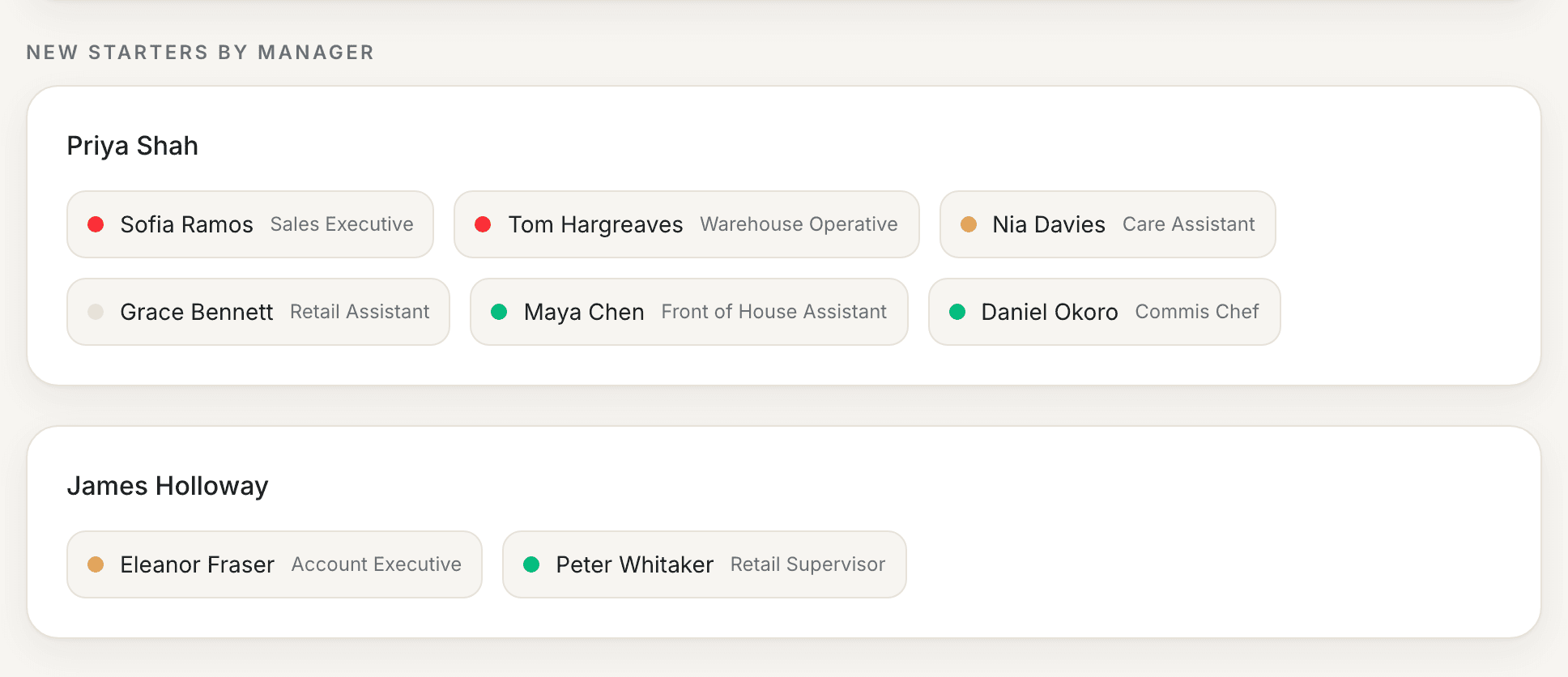
One calm view of every new starter under every line manager, each marked red, amber or green. Most need nothing from you, so you manage by exception: the few who do stand out at once.
Line managers own the relationship with each new starter. The head of people keeps an eye without micromanaging, and steps in only where it matters.
Your job is not to run anyone’s onboarding. It is to spot where a start is going wrong and offer the line manager your support. Accolgo suggests a short note you can send them.
A new starter can also ask for a private word with someone senior. How that works is set out once, under Built on trust, below.
Built on trust
Clear with new starters about what is shared, from the first email.
Accolgo is a trust-based system, and every new starter is told so in the first email. Nobody reads individual answers from new starters, line managers and buddies, and that includes the head of people and everyone in HR. Accolgo's software turns them into a colour, the reasons behind it and a suggested next step and conversation for the line manager. The answers are encrypted at rest by our database provider. A note is different. If a starter writes a note to their line manager, the manager reads it. If the starter's next check-in is still not settling, the head of people sees the note too, with what the manager did. A note that raises a safety concern also goes to HR when Accolgo picks it up, or to HR alone if it is about the manager. The person who set up Accolgo is the account owner: whoever signed the organisation up, usually the head of people.
A calm view across everything
One calm view across every new starter and every manager, so nothing slips between the cracks. The head of people can see, at a glance, where a good start is quietly going wrong.
A private word, and who reads it
A private word goes only to the senior people your organisation has set up to receive it: its head of people and HR team, and any named senior contacts. If the only senior person is the starter's own manager, the starter is told this before sending. The head of people gets an email alert the moment a private word is raised, and a Monday overview of everyone.
A starter can also ask for a private word with someone senior. That goes to the head of people and any named senior contacts, not to the manager. Whoever reads it decides what happens next, which may include telling the manager. If the organisation has nobody senior except the manager, the starter is told this before they send it.
Checking notes for safety
Our software checks each note for words that suggest a risk of harm, sexual harassment or bullying. If it finds them, the senior people you have named, usually the head of people, are emailed about it.
Questions people ask us
The interactive demo shows the line manager view and the Head of People view. No login needed.
How do you decide something is worth flagging?
At every check-in, Accolgo compares the new starter's answers with their own earlier answers, and with what their line manager and buddy report. The line manager is prompted when the starter's own answers are low or falling, when the three views differ by a clear margin, or when check-ins go unanswered. When all three agree things are going well, nothing happens. The thresholds are starting points. We keep a weekly record of each starter's reading, and of anyone you mark as having left, so the thresholds can be checked against real results.
What are you actually measuring?
Four dimensions that published research has linked to whether someone settles successfully into a new role: their connection to the people around them, whether the role is matching expectations, whether they're properly equipped, and whether they feel they're contributing. We took that research and built our own model on it, with our own questions and our own rules.
Where do the questions come from?
The questions are not a survey someone brainstormed. Each one is chosen to read the few things that genuinely shape whether a new starter stays: whether they feel they belong, whether the job is what they were told it would be, and whether they are set up to do it well. The wording draws on established thinking about why people leave in their first months, refined so it reads as human, never clinical.
There is a full methodology behind how the questions are built, sequenced across the six months, and read together. We are very happy to walk you through it in detail. Just ask.
Is this AI?
No. Every suggestion a manager or head of people reads comes from a library of reviewed, human-written guidance, with the details filled in by fixed rules. AI never writes anything about your people and never decides what's worth a conversation. The rules do that. The only AI in Accolgo is the in-app help assistant, which picks the help article that answers your question.
Does this work for any type of role, not just office jobs?
Yes. The model is designed to work across sectors with very different working patterns, from professional services, healthcare and the public sector through to retail and hospitality.
Will this label someone as a flight risk?
No. There is no score out of ten and no league table. Each new starter has a plain marking, such as Settling well or Needs attention, which describes how the start is going, never the person. With it, the line manager gets a suggestion for a supportive conversation.
Is this a way of monitoring new starters?
No. There's no monitoring of the content of anyone's email or messages, and no tracking of general work activity. The only information the model ever sees is what someone chooses to answer in their own check-in.
Who sees the answers?
Nobody reads individual answers from new starters, line managers and buddies, and that includes the head of people and everyone in HR. Accolgo's software turns them into a colour, the reasons behind it and a suggested next step for the line manager. The answers are encrypted at rest by our database provider. A note is different. If a starter writes a note to their line manager, the manager reads it. If the starter's next check-in is still not settling, the head of people sees the note too, with what the manager did. A note that raises a safety concern also goes to HR when Accolgo picks it up, or to HR alone if it is about the manager. The person who set up Accolgo is the account owner: whoever signed the organisation up, usually the head of people.
Where does a request for a word go?
A request for a word with the line manager goes to that manager, by email, straight away. If nobody follows it up within two working days, the head of people sees the new starter named in their Monday email.
If the note contains words that suggest a risk of harm, the head of people or your named senior contacts are emailed at once.